Posts

Javascript Control For Animated Gifs

This is _quite_ cool:  https://github.com/buzzfeed/libgif-js  as it  gives you a move_to(frame) for animated gifs. So now you can wrap up a lovely, hipster-parallax scroll locked page animation as a gif and roll it back & forth. SWEET. NB: Appears to work by first writing the gif images to a Canvas and grabbing the images from there, so it won't work well in ancient IEs.

The Diverging World Of Social Networks

Firefox’s announcement of Hello video chat built into the browser itself this week showed me  V+VoIP is becoming a commodity service - you can communicate directly via message or phone or video from whatever community you both share ; which makes sense in a world of divergent social networks. I talk to my friends via iMessage, my family via Skype, my work colleagues via Hangouts, my virtual geek friends via G+, Teachers via Pattr, people I used to know/need to get in touch with for some reason via FB, music lovers via Rdio messenger, etc. The web is fracturing away from the visions of Zuckerberg & Brin, their mistake being that individuals are singular societal atoms (also a flaw with Smithian economic models, you might note) when in reality we are developing multiple facets of our personalities with different groups, and interacting with those using different sites/tools - as if we are  multiple people.

Making MCrypt Work In OSX CLI Terminal Apps

OSX Terminal runs a different version of PHP to Apache by default, so smashing "php blah.php" into the command line can have different results to the same script run via browser. You might notice this if you get an error such as "Call to undefined function mcrypt_decrypt()". Frustrating. Edit your .profile file (or maybe .bash_profile) and add the betterer  php binary folder to your path: export PATH=.:/usr/local/php5/bin:$PATH

How To Get Around Annoying New SMTP Server Requirement In Gmail's "Add another email address that you own"

Image
In their esteemed wisdom, Google have changed the process for adding an alias. It used to be SO SIMPLE: Just click the: then smash your new shiny domain specific e-mail address in. Gmail emailed you to make sure you actually had things at your registrar forwarding mail to you, then when you entered their verification code it was all good. 3 minutes tops. For some reason they are now requiring that email address is ALREADY set-up with an SMTP server etc. BUM. You can get around it though, by filling in gmail itself as your mail send server: Set the SMTP server to smtp.gmail.com Username gmail is your full email address (e.g. spannerboy@gmail.com) Password is your gmail password Port = 465 TLS/SSL required = yes Ta! Don't forget about gmailtable.com - that invaluable complementary gmail tool.

½ Connection Wi-Fi

Future Wi-fi standards should have the concept of a ½ connection; a way to distinguish "open" gatekeeper connections. This would prevent a) constantly connecting to fake "open" networks as you walk about any city (effectively destroying your connectivity) b) your crappy BT Home Hub "open" version connecting in favour of your real one. ALSO Android / iOS  please only connect to known secure networks, ASSUMING for now that any open connection is a gatekeeper. OK? Thanks.

jQuery showHide() Extension

Clicking to either show or hide something gets coded all the time, and it's a nause, so here is a one line jQuery extension to toggle show/hide. 1. Smash this piece of javascript in your header or somewhere useful: $.fn.extend({ showHide: function() { if ($(this).is(':visible')) $(this).hide('slow'); else $(this).show('slow'); }}); 2. ...it extends jQuery so that you can do: onClick='$("#someDivOrSimilar").showHide();'

Adobe's biggest mistake...

...was skimping on dev resource for the Mac Flash player. If that decision - which probably saved a developer (or at most two) had not been made, the memory leaks that caused most crashes on Macs could have been avoided, deflecting Steve Job's ire and the subsequent exclusion of Flash from the mobile web (and further down the line the whole web as it unifies)

Programming And Human Progress Are Becoming Intertwined (but we need more than AngularJS and it's Hipster friends)

Come on DEV world; let's have some proper innovation in programming. Hipster coding paradigms of the last couple years (Angular, Ruby, etc I'm looking at you) have exponents spouting "look, I've written no Javascript!". Yeah, well you've written a TON of Angular. In fact, I could have done it with less code in standard javascript & HTML. Incremental benefits in some areas (usually academic, along the lines of "better" practice coding structures) are too often negated by added complexity; legacy nightmares (out-of-fashion code is not pleasant 5 yrs later) & increased dev time when the real-world doesn't match the ideological utopian world envisaged by the creators. This is why we're all still programming C/Javascript/HTML/Perl using slightly better text editors. Occasionally genuinely useful new tech is added to the list (jQuery for example) - but where is the game-changing development system that allows for an order of magnitude i...

How To Make A Table In Gmail Messages

This (embarrasingly) simple online tool allows you to make tables in gmail messages. The lack of this feature in googlemail has annoyed me for some time, so I went to Google Campus London and constructed this one-page-wonder. If I was to slap a couple AdWords ads on it would that make it the fastest ever startup from conception to monetisation I wonder? www.gmailtable.com

Open Letter to DVLA - Disappointment at Verified By Visa Adoption

OPEN LETTER TO DVLA ( if you wish to write yourself, it's: evl.feedback@dvla.gsi.gov.uk ) Not sure how to make a complaint, but suffice it to say this is one. I was disappointed to see the previously consumer friendly tax disc system implement Verified by Visa. Why? 1. This system is anti-small business (such as mine) being thrust onto them as an extra payment hurdle that big players like Amazon do not have to implement. Government should not be supporting systems that actively hurt small UK engines of growth in favour of big global corporations IMO. 2. It is anti-consumer, not just because it makes smooth processes (like your own) more convoluted, but analysis of the protocol by academia has shown it to have many security issues that affect the consumer, including greater surface area for phishing and a shift of liability in the case of fraudulent payments (see http://en.wikipedia.org/wiki/3-D_Secure#General_3-D_Secure_Criticism ). Basically, Visa can more readily get o...

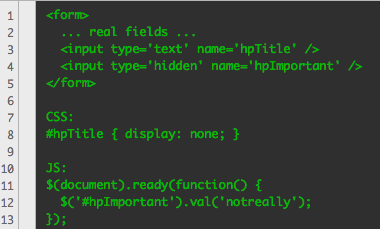
Double Bluff HoneyPot

Image
Trying to avoid form CAPTCHAs, so considering implementation of a "Double Bluff" honeypot to stop spam. Goes like this: CSS hidden, traditional honeypot input with a tempting name like 'title' that's empty for robots to inadvertently fill. Then a hidden input that is javascript filled once page has loaded. Checking the first pot is empty and the second full should capture all but the mightest spam routine...

Installing LAMP Apache/MySQL/PHP on Chromebook/Chromebox

Google Chromebook / Chromeboxes make excellent mini web-servers for development/testing/office use, or for using in kiosks / taking to tradeshows etc. Amazingly there is enough space on them for a reasonable sized web-site and database, and the oomph is comparable to a medium-size virtual server from one of the popular web-hosts. Firstly, get your Chromebox / Chromebook running Linux by installing Chrubuntu: Follow this guide here ->  http://webonaut.blogspot.co.uk/2012/11/installing-ubuntu-linux-on-your.html Bring up a Terminal. (Remember, your user is called "user" with password "user" by default). Type: sudo apt-get install tasksel sudo  tasksel Use the cursors to select "LAMP" (dom't deselect the default options or you may take away your desktop!) then hit return. (BTW: Now is a good time to try Edubuntu as it is cool, and openssh-server is useful too ;) Give the mysql root user a password when prompted. Test it out! Try this ...

Installing Ubuntu Linux on your ChromeBox/ChromeBook

NOTE: THIS WILL WIPE YOUR BOX! (but you only store stuff in the cloud, right?) Switch the developer switch on your machine (it's in a little hole on the back of the Chromebox. Use a paper clip and BE CAREFUL - it's not a strong switch) Switch the machine on. The unhappy face means you are in developer mode (sweet!). You can wait (and put up with the loud double-beep) or press Ctrl+D to continue Log into ChromeOS as normal Open a browser window and press Ctrl+Alt+T to bring up the mildly rubbish in-browser crosh terminal type "shell" to get a decent bash shell type "sudo bash" to get an even better root shell! type " chromeos-firmwareupdate --mode=todev " to update and properly enter developer mode Note: switch back later by typing the reverse into an Ubuntu shell, e.g. " chromeos-firmwareupdate --mode=normal " type "reboot" and follow steps 4,5 and 6 again The next steps are a bit convoluted, but here's a handy ...

Disabling HTML5 Video Right-click Download

So, for the Arena Hotel project I've just completed I needed to prevent the default HTML right-click context menu that allows download of videos. There is no tag parameter for this, so the only way you can do it is by disabling context menus either on the container div, or the whole document. Wedge this code in: $(document).ready(function(){   // Kill the right-click context menu globally   document.oncontextmenu = function() { return false; }   // or just kill for a particular container div   $('#mydiv').bind('contextmenu',function() { return false; }); });

Mountain Lion MySQL Death Bug

Like a bad tech cold, the Mountain Lion MySQL death bug has finally (inevitably?) reached me having already taken out several developer friend's systems. This can result in you losing ALL of your data, so backup your data directory FIRST - probably it'll be in /usr/local/mysql/data so: sudo bash cp -R /usr/local/mysql/data ~/backups/ Next, kill off your duff my.cnf file: my /etc/mysql.cnf /etc/mysql.cnf.old ... and restart: mysqld --verbose

Not getting PHP errors following Mountain Lion Upgrade? What to do...

After upgrading to Mountain Lion I found that my php.ini (usually in /etc/php.ini) had been nuked meaning that no errors were being displayed in my development LAMP environment :( Actually, it seems that Apple simply rename your existing php.ini file to php.ini-5.2-previous (or similar) so that you jump back to the default PHP settings. Rectifying this is fairly straightforward however - simply: 1. Open Terminal 2. Log in as root by typing  sudo bash 3. Type: cd /etc cp php.ini-5.2-previous php.ini 4. Restart apache with:   apachectl graceful And you're good to go...

Free Early Years software for 2012

Really proud to announce that our increasingly popular school pupil tracking software Pupil*Asset  is going to be offering support for the new Early Years EYFS foundation stage profile for FREE (so long as someone at the school gets training to keep our support guys from going crazy...) If you are interested in tracking the revised FSP (from Sept 2012 for ac.year 12/13) you can register your interest here . There are only a limited number of training places (and hence systems) so get in there!

Script to Toggle TinyMCE for ALL TextAreas

TinyMCE has it's foibles (as you will surely know if you've found this post) and many people - particularly those with HTML knowledge - like to turn it off. In our CMS this is achieved with a toggle button, and some javascript. I thought I'd share it, because it is SO useful to us: 1. Make sure this javascript appears somewhere: $(function() {   $("#richTextToggle").toggle(function(){     $("textarea").each(function(){       tinyMCE.execCommand('mceRemoveControl', false, $(this).attr('id'));     })   }, function () {     $("textarea").each(function(){       tinyMCE.execCommand('mceAddControl', false, $(this).attr('id'));     })   }); }); 2. Create a toggle link / btn: Toggle Rich Text

Changing your Mac OSX Terminal's default text editor

For just this session, simply type: export EDITOR=emacs (or replace emacs with vim , nano or whatever) Personally, I like to use emacs on servers, but on my Mac TextWrangler is way more helpful. One of the great things about TextWrangler is that you can get it to magically pop edit requests out of the Terminal simply by installing it and typing "edit". To make all other programs use this method try: export EDITOR="edit -w" For a more permanent fix, add the same line to your .bashrc file. If you've not already got one of those, type: edit ~/.bashrc (The one exception is git, which you'll need to configure thus:) git config core.editor "edit -w"

Mobile Detection Script (Javascript redirect for iPhone / Android / Blackberry)

I struggled to find us a usable mobile javascript redirect - even StackOverflow's helpful crew were awash with geeky prejudice along the lines of "not all mobiles have javascript enabled"... Almost all of the modern web requires javascript to be on, and if you're a) one those geeks who has it switched off or b) have a pre-Android/iPhone/Blackberry handset then you can try your luck with the main non-mobile site anyway. So here goes - a short, quick, simple mobile detect + redirect script: /* Klik Mobile Detection Script */ function touchAndGo(where) {   var ua = navigator.userAgent.toLowerCase();   if (ua.search("iphone") > -1 ||  ua.search("ipod") > -1 ||  ua.search("android") > -1 ||  ua.search("blackberry") > -1 || screen.width <= 480) {     location.href=where;   } } touchAndGo("http://touch.mysite.com/");